
At Shortstay, the contract is 100% digital: you receive it, read it, and sign it directly through the app — no paper, no notary office, and no travel required.
Why electronic signature?
Legal validity — the electronic signature is recognized in Brazil by Provisional Measure No. 2.200-2/2001 and by Law No. 14.063/2020, which regulate electronic signatures in the country.
Security — each signature generates a record with date, time, and identification of the signer, ensuring the authenticity and integrity of the document.
Speed — you sign in minutes, from wherever you are, and the reservation process continues immediately.
How to sign through the app
When the reservation is approved, we generate the contract and you receive a notification by e-mail, WhatsApp, and push notification.
Open the Shortstay app and access your reservation.
In the "Contract sent" step, tap on Sign Contract.
Read the contract carefully — check check-in and check-out dates, amounts, and conditions.
Confirm the electronic signature. All set! ✅
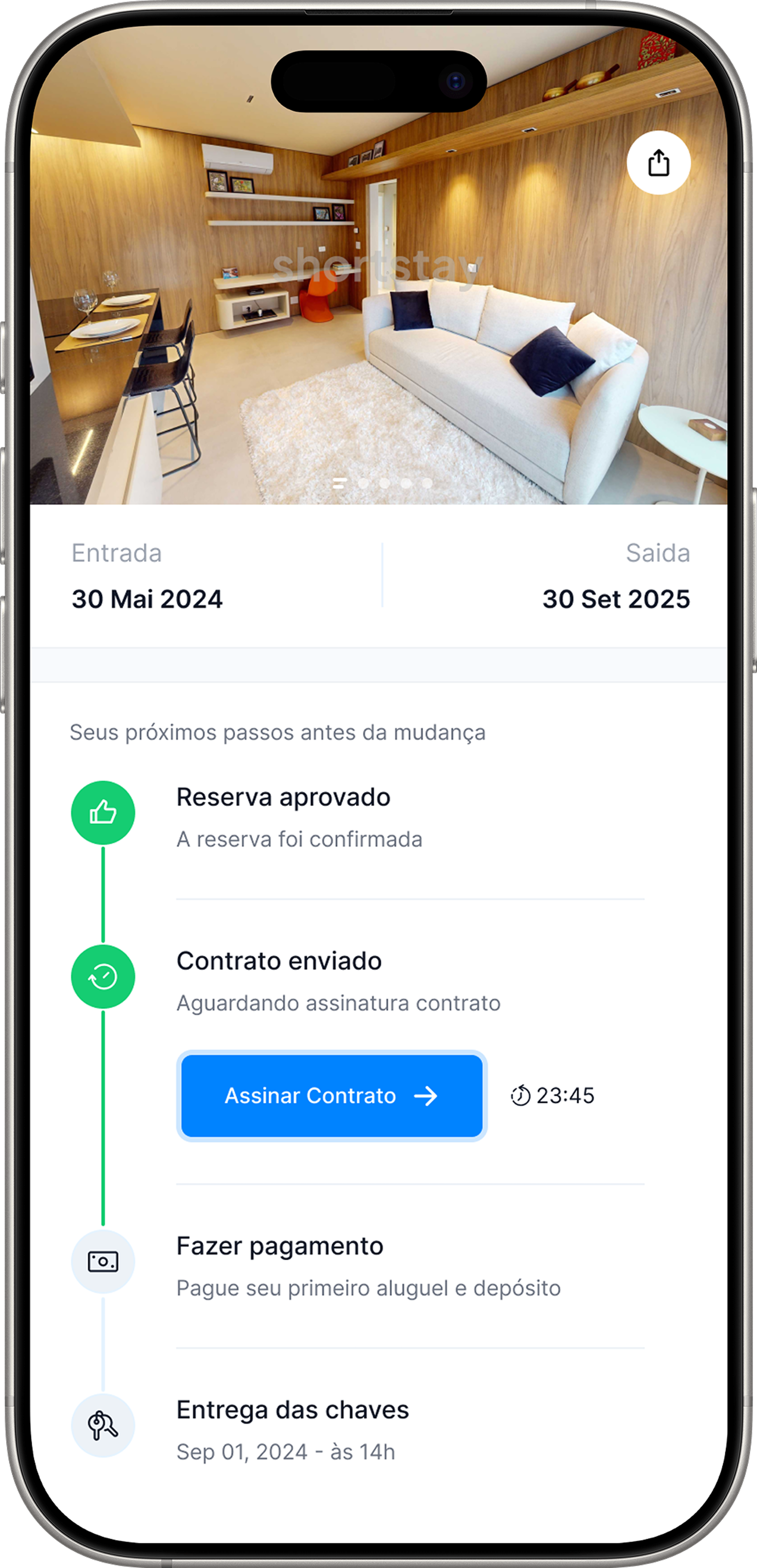
Pay attention to the deadline ⏱

Where do I find my contract afterwards?
The signed contract is available in the app, in your reservation, for consultation at any time.
Related articles: Shortstay app: where to download it and why it is essential · How long does the reservation analysis take